The demand for short video sharing platforms has skyrocketed with the success of apps like TikTok, Instagram Reels, and YouTube Shorts. If you’re a developer, entrepreneur, or startup looking to build your own short video sharing platform, you don’t need to start from scratch. With a ready-made PHP script, you can launch a feature-rich platform that allows users to upload, share, and engage with short-form video content.
In this guide, we’ll explore the features, benefits, and setup process of a Complete Short Video Sharing Platform Script in PHP.
Why Choose PHP for a Short Video Sharing Platform?
PHP remains one of the most popular backend languages for web development. Here’s why PHP is a great choice:
-
Open-source & cost-effective – reduces overall development costs.
-
MySQL integration – handles large databases efficiently.
-
Scalable – supports millions of users with proper optimization.
-
Easy to customize – add unique features like filters, effects, or monetization.
-
Large community support – tons of plugins, tutorials, and documentation.
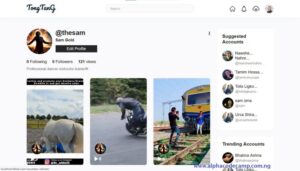
Key Features of the Short Video Sharing Platform Script
A robust PHP short video sharing script comes with all the modern features needed to run a platform like TikTok or Reels. Some highlights include:
User Features
-
Upload and share short videos (MP4, MOV, etc.)
-
Add titles, descriptions, hashtags, and categories
-
Apply video filters and effects (optional integration with FFmpeg)
-
Like, comment, and share videos
-
Follow/unfollow creators
-
User profile management with bio, profile picture, and followers list
Admin Features
-
Manage users, creators, and content
-
Approve or reject video uploads
-
Control site settings, ad placements, and monetization options
-
Advanced analytics (views, likes, most trending videos)
-
Reports and content moderation tools

Advanced Features (Optional)
-
Responsive design (works on mobile & desktop)
-
Dark/light mode for better user experience
-
Push notifications (with Firebase integration)
-
Monetization with Google Ads or custom ads
-
Live streaming integration (advanced feature)
Technical Requirements
To set up this short video sharing platform script in PHP, you’ll need:
-
Hosting/Server: Apache or Nginx
-
Backend: PHP 7.4+
-
Database: MySQL 5.7+
-
FFmpeg: For video processing and compression
-
cPanel/DirectAdmin (recommended for easy setup)
Step by step to run the script (installation)
A server is required to run this project. We will be using XAMPP.
For XAMPP
(The demonstration video is provided above; watch video for a better installation)
- Scroll down and click on download to download the script.
- Extract the source code folder in your pc.
- Copy the folder you extracted and paste it in (for XAMPP xampp/htdocs, for WAMPP wampp/www, for LAMPP var/www/html) root directory in your pc.
- Open your XAMPP Cpanel and start Apache and MYSQL.
Creating a database
- Open your browser.
- Open a tab and go to this path “http://localhost/phpmyadmin/”.
- Click on New on the left side of the screen.
- Create a database named “tiktok” (or with any other name you want) and click on create.
After creating a database
(Watch video for easy installation)
- Open a new tab on your browser and go to the path. E.g. “http://localhost/tiktok”.
- The installation will start and the requirement page will display, all must be enabled to continue installation.
- Enter purchase key.
- Fill the form, e.g.
-
- Database host – localhost.
- Username – root.
- password – (leave empty or put your XAMPP password)
- Database name – tiktok (or the name you used).
- Install (installation might take some minute’s).