The Catering Management Software (CMS) is an end-to-end web application built with PHP (compatible with PHP 8+), MySQL, and modern HTML/CSS/JS. It helps catering businesses manage menus, events, bookings, quotes, invoices, inventory, staff, and reporting from a single interface.
This platform is ideal for:
-
Catering companies (small to medium)
-
Event planners
-
Restaurants offering event catering
-
Freelance caterers
Key goals:
-
Simplify booking and event management
-
Streamline menu & recipe management
-
Automate quotations and invoices
-
Track inventory & staff assignments
-
Provide business insights with reports
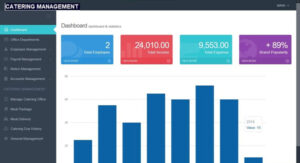
Core Features
1. User & Role Management
-
Admin, Manager, Chef, Sales, Customer roles
-
Role-based access control (RBAC)
-
Secure authentication & password reset
2. Menu & Recipe Management
-
CRUD for menu items and categories
-
Recipe ingredients & cost per serving
-
Portion sizes and price calculation
-
Image upload for dishes
3. Event Booking & Scheduling
-
Create and manage event bookings (date, time, venue, guests)
-
Assign menus, staff, and equipment to bookings
-
Booking status (Pending, Confirmed, In Progress, Completed, Cancelled)
4. Quotation & Invoicing
-
Generate automated quotes based on menu & guest count
-
Convert quotes to invoices
-
Tax, discounts, deposit, payment tracking
-
Print/Export PDF invoices (via a PDF library like TCPDF or Dompdf)
5. Inventory & Procurement
-
Track ingredient stock levels
-
Auto-calculate stock consumption by bookings
-
Purchase orders for low-stock items
6. Staff & Resource Management
-
Staff scheduling for events
-
Role assignment (cook, server, driver)
-
Payroll snapshot per event or period
7. Payments & Transactions
-
Record online/offline payments
-
Payment history & outstanding balances
-
Integration-ready hooks for payment gateways (Stripe/PayPal)
8. Reporting & Analytics
-
Revenue by period, booking summary, item popularity
-
Inventory consumption reports
-
Staff utilization & performance summaries
9. Notifications & Reminders
-
Email notifications for bookings and invoices
-
SMS integration-ready (Twilio) for confirmations and reminders
10. Settings & Customizations
-
Tax rates, currency, business details
-
Email templates & branding
-
Multi-language support ready
User Roles & Permissions
-
Admin: Full access — manage users, settings, reports.
-
Manager: Manage bookings, quotes, invoices, menus.
-
Chef: View assigned events, manage menu/recipes, update statuses.
-
Sales: Create quotes, follow up bookings, convert to invoice.
-
Customer: Create booking requests, view quotes/invoices, make payments.
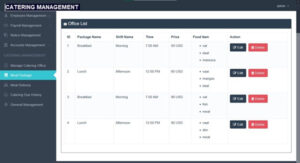
Requirement
- PHP 5.6+
- Mysql database
- Xamp/ wamp – local server
Step by step to run the script (installation)
Before we run this script you must have installed a server (localhost) on your computer like XAMPP/LAMP/WAMP. Or you have a hosting plan.
- You Download and extract the file.
- Run your XAMPP control and start Apache and mySql on your pc.
- After doing that, copy the folder you extracted and paste in “C:/xampp/htdocs” directory/ path.
- Open any browser (i.e., chrome) and browse the path “http://localhost/phpmyadmin/” this will open the phpMyAdmin
- When the page opens, you click on new to create a new database for this project. This is found on the left side of the screen.
- Create a new database called “catering_system” and click on create.
- Click the import tab on tab menu.
- Click on browse button and select the file name “catering_system.sql” found in the database folder we extracted earlier and click on Go.
After creating a database
- Then Open another tab on your browser and go to the path. E.g. “http://localhost/cateringmanagementsystem/”
- Then login and explore